End of Sem 2.2!!!
Finally, its the end of the semester!!! And the final thing I need to do is to make a animation according to a certain sound file!!!!
Here’s the dialogue for the sound:
Han Solo: “Hey Your Worship! I’m only trying to help!”
Princess Leia: “Would you please stop calling me that?!”
Han Solo: “Sure Leia.”
Princess Leia: “*sigh* You make it so difficult sometimes…”
Han Solo: “I do, I really do.”
– Star Wars
Here’s the Scenario that me and my partner (this project is done in pairs) came up with using this sound file:
Having just moved her house, Leia is unpacking her stuff in her new room. However, Han Solo came in and started to mess her things up, even though it was not intentional. Leia, fed up with his antics, slap his hand away….(then the sound file will begin)
So, after coming up with a scenario, we need to have a storyboard, to know the key poses for the rigs/animation, and here they are:


AND THEN….We start animating!!!!
Here’s what I have done:
and here’s the combination for both my partner and I have done:
Not Bad Right!!! ^_^ (Inner me: But very bad!, me: OI!)
Whew!!!
And that’s all for this project!!! It was fun trying to come up with poses for the animation, I think that I have earn a reputation called falling girl, with all the poses I am trying to do…on my person. Yes, I kept on acting out on the way I fall -__-”’.
Also, texturing should is a torture yet it is fun. Why do I say this? Cause, while I was doing texturing, I had lots of fun doing it, making all the items more “WOW”. Yet, when we tried to test it on other computer/laptops, all the textures DISAPPEAR!!! Do you have any idea how low my heart have fallen at that time? I think my heart took a permanent residence on my feet. Luckily,(after lots of burning and using thumbdrive to test on other computers) thanks to the help of some friends, we managed to solve it, by placing the pictures in the scene folder of the whole project file. (Before you ask, yes I did set the project). But I was a bit confused, as to why we should place it there? Shouldn’t it be able to find the image as long as we place it inside the main project folder? ?_? I really need to go and figure this out…
And so, that is all folks!!! I can finally enjoy my holiday! ^_^ Sayonara!!!
Questions yet again!!!!
Sooooo, I really seems to like using “Soooo”, don’t I? Anyways, After so much scripting, questions are bound to come sooner or later haha, and here they are!!!
1st Question –
Imagine you are creating a scene where a car drives along a straight road, but swerves around at random as if the driver is drunk. Do you think it would be useful to know how to program using MEL when creating this scene? Explain.
Well, of course it would important!!! Do you even know how hard it do keep on doing key frame by key frame?? It would drive you nuts thats for sure @_@. Programming in Maya using MEL will surely help in this part of the aspects. We do not actually have to make key poses and frames (Me: Merlin Forbid, I could die with all this work), we simply need to program it so that it will move in a way we wanted and scrub through the timeline to view the results without any key frames. This is similar to the zombie file I did in the previous posts.
2nd Question –
For the drunken car scene, give TWO advantages and disadvantages (pros and cons) of using scripting to create the swerving car animation.
The two advantages would be that, I will not have to make key frames by frames as I have stated earlier, and that if you wanted to change the attributes, like making the car go faster, it will be easily done. On the other hand, while it is easily used, the outcome might not be as good as if you have done frame by frame, Maya will only be able to do the basic. Also, because of the script as well as the moment the timeline is scrubbed through, the animation will keep on playing it, continuing from where it stop, we might not be able to spot the mistakes and we are also unable to change the animation to how we wanted as it was programmed to continue on, which could be very frustrating as Maya will do its own programming, without caring what you want. The animation also can’t be changed easily due to the fact that there are no key frames.
3rd Question –
You might think that programming using MEL is similar to using ALICE (in Year 1). It is actually very different. Explain TWO of the main differences, as far as you can tell.
Mama Mia!!! I had totally forgotten that Alice existed!!! Errr…….well, as far as I can remember, I was told that Alice is actually for beginners, using only “For Loops” and “While Loops”, calculating the distance and all that stuff, also, the characters are not able to move as freely as it did in Maya. Ya…..I think thats about it?……Don’t look at me like that alright? Its not I could remember all those stuff, I even tried to search it!!! But it kept on giving me results on Alice in Wonderland!!!!!
Sooooo,(here we go again), after all these exercises on Scripting in Maya, I have learnt that even Maya have Scripting!(DUH!) As I only though that Maya is only used for animation. I also believe that scripting in Maya is also quite similar to flash scripting!!! (which is probably why we had to learn flash first). Thats is the POWER of Scripting haha.
And this is me over and out haha see you soon!!!
Using Other MEL Scripts!!!
I had download a file From here:
http://www.comet-cartoons.com/maya.html (cometScript.zip)
From here, I was able to use the script in this .zip file and use it in my Maya!!!
Like this:

These are mostly used for rigging I believe.
Here’s a little story I made up with all these symbols:

It goes like this: (each time a new “-” appears, it means it is the next symbol)
– I was bored with nothing else to do,
– Then I decided to follow an arrow symbol for fun,
– And came across a sphere like room, after getting inside the room,
– I saw a cross-shaped platform with a box in the middle.
– It was them an idea pop up into my head.
– I then stood on top of box and jump off it, again and again, in different directions!
Me: This was made purely for fun, it has no meaning whatsoever haha.
Scripting again!!!
This time I am following this:
http://www.youtube.com/user/MayaHowTos
And learn what is going on in there of course!
While doing this whole exercise, I came upon this problem:

When I came across this problem, I was very confused, because I typed exactly the same as what the tutorial said. Then I actually went and look around my keyboard, searching for any other symbol that could replace this:

and it happen to be this:

Haha
Soooo, after looking at all the six videos, I need to create a random number of zombies and create a number of zombie.
Here’s the code for the whole thing:
if (`window -ex zacp_win`) deleteUI zacp_win; //deleting the window if it exist
window -wh 400 100 -t “Zombie Apocalypse Control Panel” zacp_win;
columnLayout -adj true;
intSliderGrp -l “Number of Zombies” -f true -v 5 -min 1 -max 10 slider_zombies;
button -l “Create” -c “create_zombies()”; // creating a button called create
button -l “Random” -c “create_random()”; // creating a button called random
showWindow zacp_win; //show the window
proc create_zombies(){
string $all_characters[] = `ls -tr “human*” “zombie*”`;
if(size($all_characters)) delete $all_characters;//deleting the existing zombie
int $num_zombies = `intSliderGrp -q -v slider_zombies`;
for ($i = 0; $i < $num_zombies; $i++)
{
string $new_zombie[] = `duplicate -rr -un -n “zombie_GRP#” original_zombie_GRP`;
//creating a new zombie at the humans place and grouping together with zombie GRP
setAttr ($new_zombie[0] + “.v”)true;
float $randx = rand(-1120,0);
float $randz = rand(-1120,0);
move $randx 0 $randz $new_zombie[0];
}
}
proc create_random(){
string $all_characters[] = `ls -tr “human*” “zombie*”`;
if(size($all_characters)) delete $all_characters;
float $random = rand(1,10); //the random number zombie
for ($i = 0; $i < $random; $i++)
{
string $new_zombie[] = `duplicate -rr -un -n “zombie_GRP#” original_zombie_GRP`;
setAttr ($new_zombie[0] + “.v”)true;
float $randx = rand(-1120,0);
float $randz = rand(-1120,0);
move $randx 0 $randz $new_zombie[0];
}
}
And here’s the result:

Here’s what happen once I pressed the create button:

and here’s what happen once I pressed random:

Relatively speaking it is quite easy to do this haha. Also, I just notice that I was suppose to create the window with the title “Zombiemaker” ,I had totally forgotten about it haha. To create this, I simply need to change this:
window -wh 400 100 -t “Zombie Apocalypse Control Panel” zacp_win;
To this:
window -wh 400 100 -t “Zombiemaker” zacp_win;
Scripting In Maya!!!
Alright! This time is Scripting!!!!! Kind of hard to believe that there is actually programming in Maya 0_0”
Ok ok…So, this is the website of where I will learn scripting in Maya:
http://download.autodesk.com/us/maya/Maya2012_Getting_Started/index.html
From there, I have done from lesson one to lesson four.
So….here’s from the Second lesson: (the first is just an introduction)

For this lesson, I am suppose to create lights by scripting!!! Here’s the result!

And below are a few screenshots of me playing with the lights:


From the above exercise, I am suppose to apply it to a cone, the script in Maya allow us to be able to save it on the shelf in Maya,

And so, here’s the result!!!
Before:

After:

This allow us create the same lightings without needing to write in the script editor again!
For the next exercise, I have created this:
This exercise actually caused me a lot time due to the fact that it kept on giving me this error:

I was almost to the point of giving up *_* as I kept on redoing and redoing. However thanks to Lyo, one of my classmates, I manage to solve the problem!!!
It was during when I am duplicating the barrels to form the top row, and the tutorial told us to delete the extra barrels:(highlighted ones)

But for some reason, even when I deleted the extra from the top rows, there was another row of barrels at the top. This is where the problem start, I simply delete the yet another extras of barrels, without checking if there are any more extra barrels. So, this actually causes the top barrel, instead of one barrel, have two barrels.
For the Last lesson,
I have to create a UI window to affect whatever I want to affect.(Does that even make sense?)
Firstly ,this tutorial teaches me to create this and to move it along the plane:


From this, I created the UI to be able to influence this:

and so, here’s a playblast of it working!!:
Block, Blocked, Blocking Part 2 with sound this time!!!
Now that I have a video (from previous post), that shows me acting from a scene, lets see how will I do with sound then?
Soooo, Please watch this video first –
(me and my stupid face -_-)
Just a video of me saying this sentence:
You dare use my own spell against me, Potter? – Severus Snape, Harry Potter.
And here’s the version of it in Maya form!!!
(I just loveeeeee his voice!!!!!!!)
This exercise really takes a lot on my eyes, haha. I had to kept on referring to the video of me saying it and back to Maya and do the exact same thing. *_* Also, I had to make sure that both the action must to compatible to the words being said, which is really easier said then done @_@.
Block, Blocked, Blocking!!!
This time, I will be doing blocking animation!!! Before doing it on Maya, there is a need to see how it fit in real life of course!!!
Soooo, view this video first –
I am the one getting punched as you can see…..The ending part is funny huh? Haha
Alright, lets get to blocking stage of this video!!!
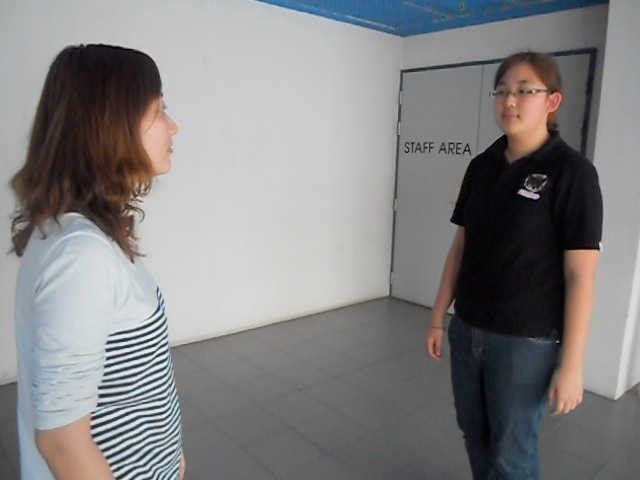
First Pose –
This shows the staging of the whole thing, both characters are standing apart of each other, doing nothing for now that is. (With me and my blur face @_@)

Second Pose –
This is where Yang Mei, the attacker, raises her arm up, getting ready for the full force punch that she is about to execute. (I looked stoic as ever T_T)

Third Pose –
And here is the climaxed part $_$, also the anticipation part!!! This is the part where the audience will know that there a very powerful punch will soon happen by the way that Yang Mei pulls her arms back. (Still looking very stoic *_*)

Fourth Pose-
The part where I got punched (Ow…) Her punch was executed at this point, this causes my face to be turned to the side due to the force of that punch. If this was in manga view, perhaps I will be spitting out saliva. (I seems to be laughing when I got punched. Opps! Wrong expression!)

Fifth Pose –
This is the aftermath of the punch. With the force of that punch, I was thrown a few steps back. Lifting my arm to cup the place where I was hit, this is to show that the punch was quite unexpected, as well as to show shock running through me. Also, due to my position, it shows that I am on the verge of falling down once the punch I received has sunk into my head. Yang Mei, on the other hand, is still following through her action, which is the punch. (I swear she is laughing….and wrong expression yet again T_T)

Final Pose –
Finally, the punch has done its job, making me fall to the ground, while Yang Mei stood there admiring her work! (please sense the sarcasm at the last point…..Me: “Poor me, getting punched and falling like a lady.” Yang Mei:”NOT!!!”)
Question Question Questionssss??!!!
Some Question regarding the previous posts!!!
1st Question –
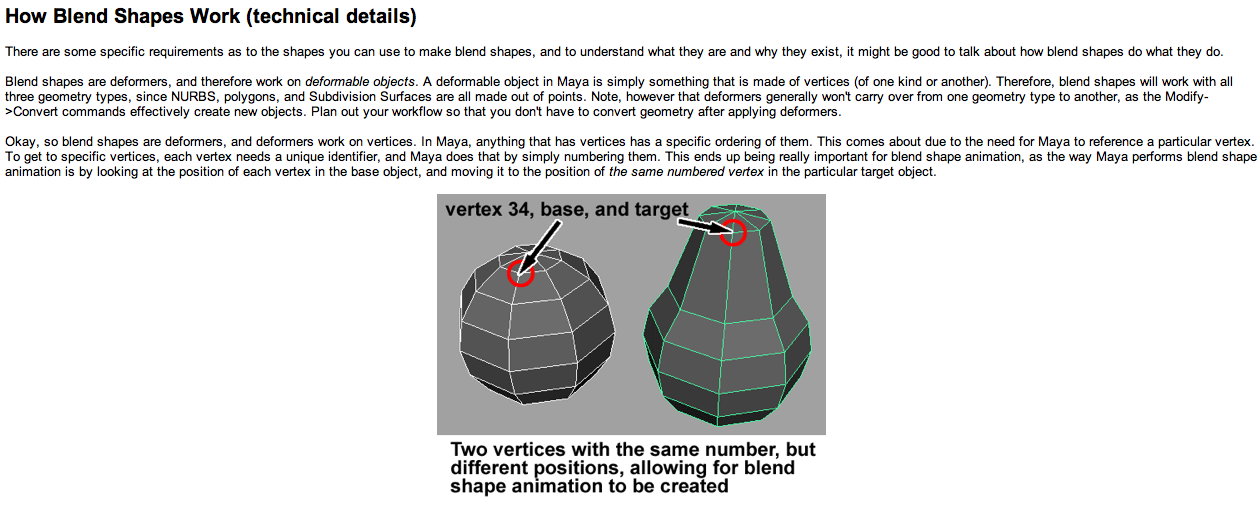
Does a blendshape require the base mesh and the target mesh to have the same number of vertices? Explain your answer, with reference to how blendshapes actually work.
To speak logically, if you want to change the original product, into something new and back to the original again, but you end up using a different product to affect the original product, it is sure that this different product will not affect ALL the part of the original product.
So, similarly, if the target mesh is different from the base mesh, the target mesh will not be able to affect all the vertices in the base mesh.
2nd Question –
Can blendshapes only be used for facial animation? If not, prove it! Animate something and post it on your blog.
Of course not!!!! Haha here’s the prove :
3rd Question –
If you want a character to look angry, you might decide to create a target mesh of the character’s head and then modify it to have an angry expression. This is NOT how it should be done. Why not? And what would be a better approach? (Hint: you want to give the animator as much freedom as possible.)
It is an of course, not a very good idea to do this way. The reason being that by doing this, when you need to animate, all you end up with is an angry expression, you will not be able to change the expression otherwise. This makes the animator, by default, create an angry face, which might not be what the animator wants.
A better approach will be……BlendShape!!!! (Duh, this is the whole point of this exercise ^_^”’ )
By using blendshapes, different expression can be created, just like what I have done in the previous posts.
Cluster and Blend Shape deformers
This is the prequel of the previous exercise!!
Looking at the lesson from this website about clusters and blend shape:
http://download.autodesk.com/us/maya/Maya2012_Getting_Started/index.html
After getting through this lesson, I had to make expressions!!!
So here’s the first expression:
And here’s the second expression:
this is continued from the first expression ^_^
and here’s from the 1st to the 2nd expression:
Haha, it looks like he’s eating something very bad @_@.
A New Year & Facial Expression!!!
A new year!!! Haha
This must be accompanied with a new subject of course!!
SOOO000ooo….Welcome to 3D Production Foundation!!!! Hahaha
A new subject ALSO means…….(Drum rolls!!!)…….new homework!!!…………..(Crows: Stupid! Stupid!)
Ok. Not funny. FINE!
Anyways, shall we get to work?
First Off, is facial expression!!!
I am going to animate a person talking, according to the sound that is given, which is:
“You don’t know the POWER of the dark side” – Darth Vader
and here it is:
1st version –
This is the first one that I did ^_^. My impression of what a person should look like with the a voice like that. However, my teacher said that when a person looked angry or, when a person is looking intimidating, they would not shake their head. (I don’t know if Darth Varder was angry when he’s saying this, I never watched star wars…T_T)
2nd version –
Here’s the improved version of the previous one………However, it seems he’s looking a bit exasperated at the beginning, doesn’t he? Haha. But I suppose it works too ^_^
3rd version –
The improved of the improved version!!! But now, my teacher commented that Boris(the rig in this animation), looks like he smell something really bad at the beginning. But, I think that it kind of fit with the voice…I have seen people who turn the face sideways before snapping it to the front when saying something that is of seriousness.
last version –
This is the final one. Since it is not working well with the head, I decided to just remove the movement all together and use the eyes to speak. See? At the beginning, you could see Boris narrowing his eyes to show his seriousness.
Haha that is quite a lot of animation huh? But doing this animation made me realized that with just one phrase, there are a lot of facial expression that could go along with it!!! Just like what I have done above ^_^ Quite cool huh? Human emotion sure is one mysterious thing ^_^
 intro3d